How to show Text Boundaries in Microsoft Word
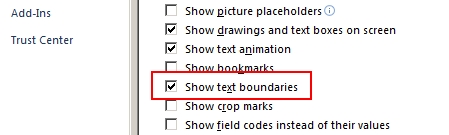
So usually or many of my friends make the borders using Page Borders, but when printed, the borders will appear or be printed when the document is printed. So that the border doesn't get printed, we make another line appear. The line I mean is the margin line or text boundaries that can be seen but cannot be printed, To display text boundaries in Microsoft Word, the way is very easy Open a Microsoft Word document Select the "File" menu, then select "Options" After that, select "Advanced" Scroll down until you find "Show text boundaries" Put a check mark on the text, then click "OK" and see the results Thank you and good luck More Tutorials: How to Delete Text Box in Word How to Print on Microsoft Word 2007 How to Insert Portrait and Landscape in Same Word Document How to Convert Word 2010 to PDF How to Convert a Word 2007 Document to PDF More Tutorials: How to Move Word Files to Desktop Screen How to Write in Pictures in Word Ho...