How to Search for Duplicates in Excel Workbook
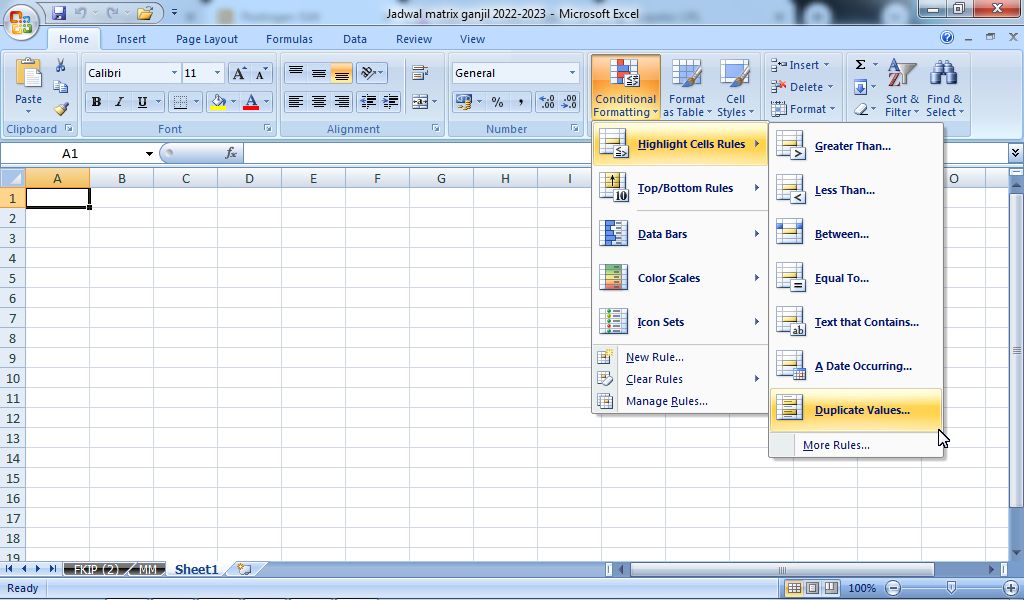
Finding duplicate data in Microsoft Excel is a difficult and tiring job, it doesn't matter if there are only 10 data, imagine if there are hundreds of data that need to be searched for duplicates. Therefore this tutorial is perfect for that. The way to find duplicate data is very easy, first open the Excel file that contains the data you are looking for the same or duplicates. After that, select the data, then select "Conditional Formatting" in the "Home" menu. Select "Highlight Cells Rulles" and again select "Duplicate Values...". More tutorials: How to Remove Text Box From Excel How to Clear Print Titles in Excel How to Show Formula Bar on Excel How to Hide and Unhide Excel Worksheet How to Copy Sheet to Another Excel File After that the "Duplicate Values" box appears, select "Duplicate" and select "Light Red Fill with Dark Red Text" if you want to mark red writing on the duplicate text, then select Ok. These c...