How to Delete Table in Microsoft Word
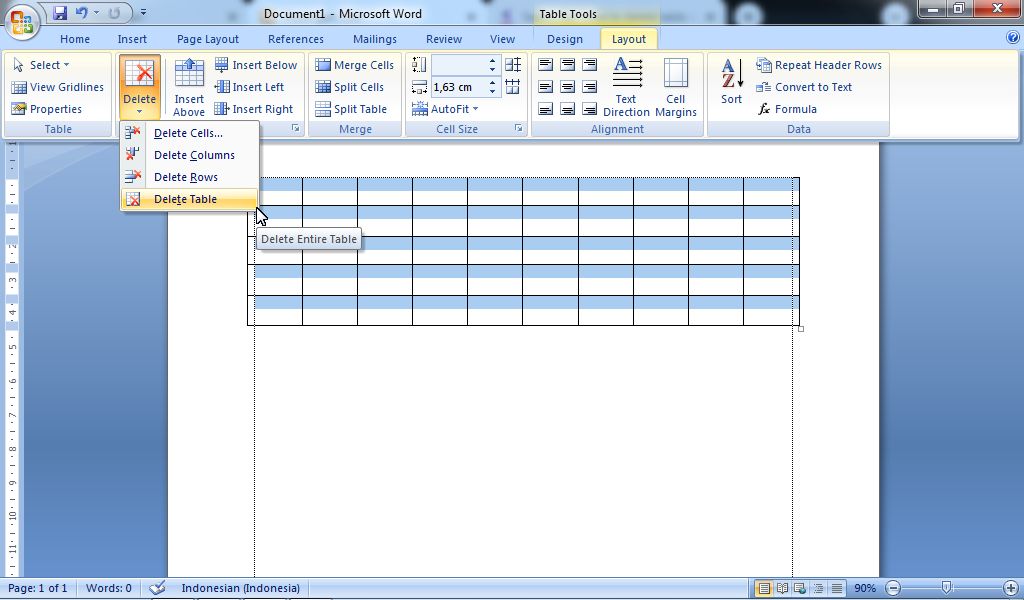
There are times when we make a mistake when creating a table, or when creating the table there are some columns, rows or even the table that is wrong and we want to delete it, but we don't know how to delete it. For this reason, in my article this time, I will share with all my visitor friends about how to delete columns, rows and tables in Microsoft Office Word 2007. More Tutorials: How to Print on B5 Binder Paper How to Print One Big Picture on Multiple Pages How to Remove Table Lines in Word Without Using an Eraser How to Make Big Curly Brackets in Word How to Delete Page Number in Specific Page In the following, I will describe one by one how to delete unused columns, rows or tables. Although the method that I will give you may already be known by many other. Before deleting an entire table, friends must first select all tables that you want to delete or delete. After that go to the " Layout " menu then select " Delete" , then four delete options will appea...