How to Insert Portrait and Landscape in Same Word Document
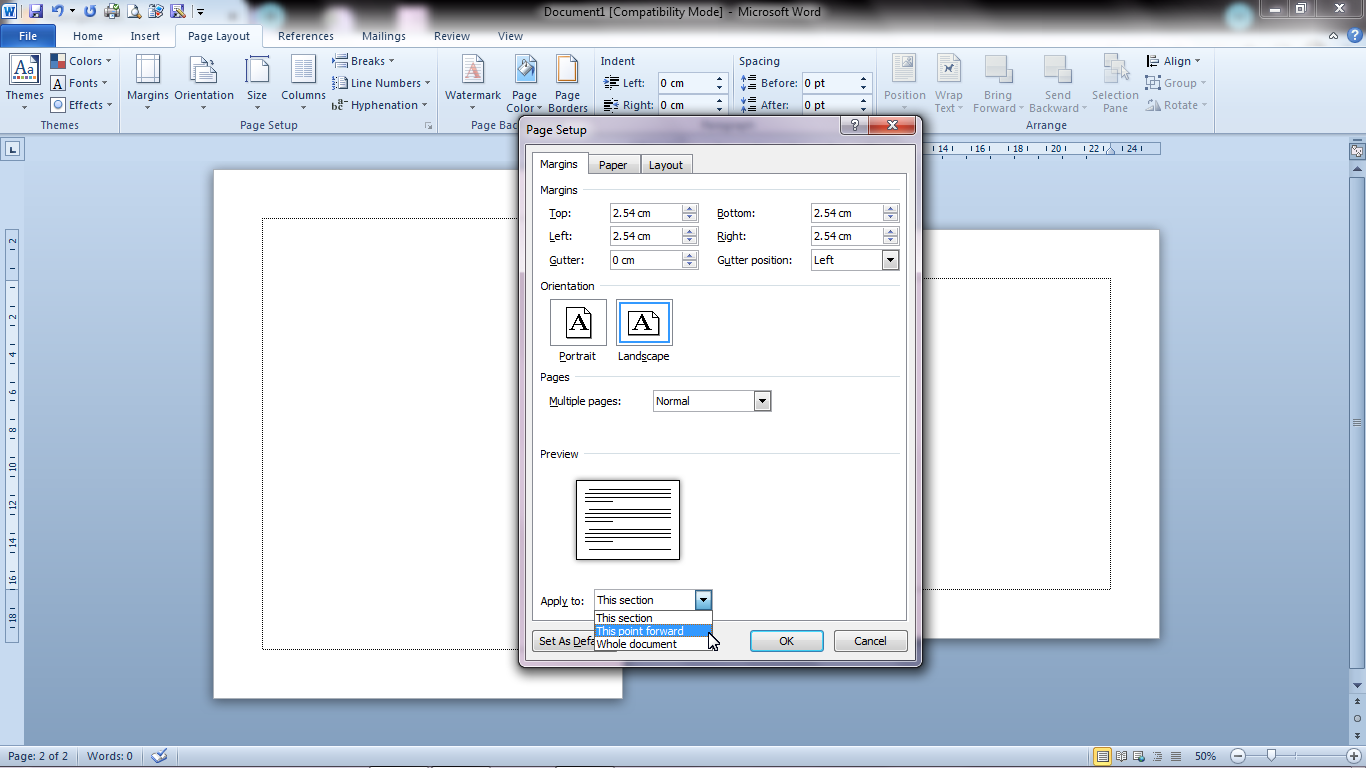
Actually, the method is very easy and almost everyone knows about it. The first step is to determine which page we will change to landscape. After that, select the "Page Layout" menu, then select " Page Setup" , click the arrow in the lower right corner. There will be a " Page Setup" Dialog box that will appear, change the paper shape from " Portrait" to " Landscape" , then change " Whole Document" to " This Point Forward" , then click Ok. More Tutorials: How to Set Default Paper Size in Word How to Change Line Spacing to 1.5 in Word How to Set Paper Size in Word How to Remove Table Lines in Word Without Deleting Text How to Print 2 Pages 1 Paper in Word 2007 So now one of our pages has changed to landscape, to change it back to portrait, please follow the steps as above. I hope my article is useful for all readers and if anyone wants to comment, please write it in the comments box below. Stay tuned and keep up with ...