How to Print 2 Pages 1 Paper in Word 2007
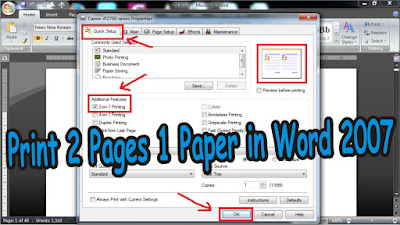
There are several benefits of printing 2 pages 1 paper in Word 2007, one of which is that it can save paper used . The method is very easy, prepare a Word 2007 document that has many pages in advance, indeed this method can be useful if the file we are going to print has many pages. First enter the " Print " menu, by pressing the Ctrl and P keys simultaneously, or enter the " Office Button " menu. Then go to " Print Properties ", incidentally this method uses a Canon printer. More Tutorials: How to Rotate Text in Table in Microsoft Word How to Delete Table in Microsoft Word Mail Merging With Microsoft Excel and Word How to Remove Text Border in Word How to Change Tab Stops in Word After that, in the " Additional Features " section, select " 2-on-1 " Printing to print 2 pages on 1 paper. After that, click " OK " and click " OK " again to start printing. That's all for our tutorial on this occasion, if you have any...