Posts

How to Print B5 in PDF

Image
Ok friends, in this tutorial I happened to use Acrobat Reader to open PDF files, maybe some of you use other applications, maybe the print menu is a bit different. Okay, first of all, prepare B5 size binder paper. Then friends open the PDF file which we will later print onto the B5 binder size paper. After that, enter the "Print" menu, surely friends know how to enter the print menu, namely by pressing the Ctrl key and P key on the keyboard or clicking the printer icon on the PDF file. More tutorials: How to Convert Word 2010 to PDF How to Convert a Word 2007 Document to PDF How to Turn Zip Into PDF How to Know PDF Paper Size Excel to PDF Converter in Excel 2007 Then friends enter "Page Setup", now here we can change the paper size to the size we have specified, namely B5 paper size. After that, click OK to save the settings, and immediately click Print to continue with the printing stage. And look at the results.
How to Search for Duplicates in Excel Workbook

Image
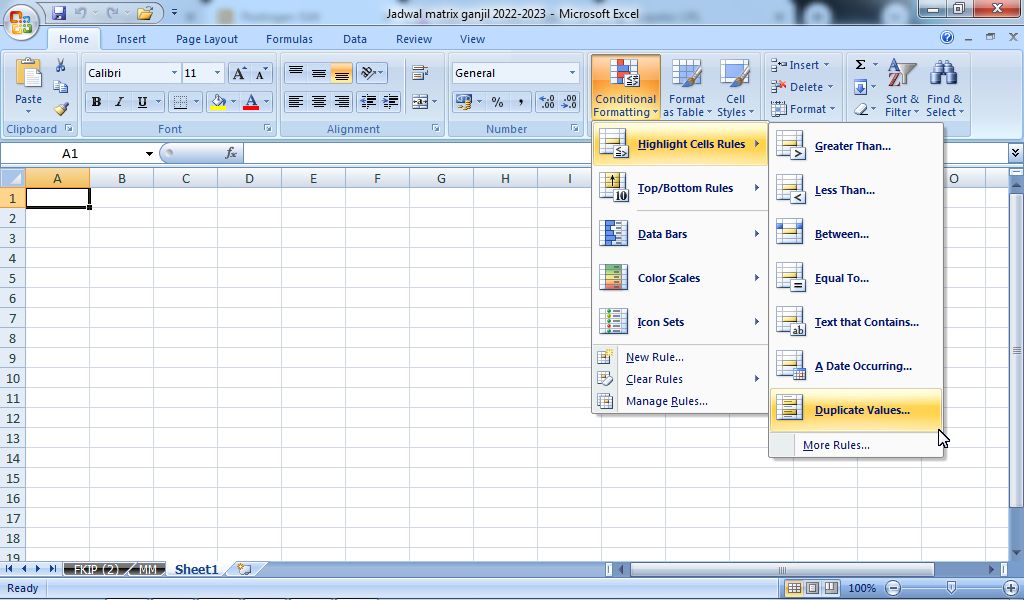
Finding duplicate data in Microsoft Excel is a difficult and tiring job, it doesn't matter if there are only 10 data, imagine if there are hundreds of data that need to be searched for duplicates. Therefore this tutorial is perfect for that. The way to find duplicate data is very easy, first open the Excel file that contains the data you are looking for the same or duplicates. After that, select the data, then select "Conditional Formatting" in the "Home" menu. Select "Highlight Cells Rulles" and again select "Duplicate Values...". More tutorials: How to Remove Text Box From Excel How to Clear Print Titles in Excel How to Show Formula Bar on Excel How to Hide and Unhide Excel Worksheet How to Copy Sheet to Another Excel File After that the "Duplicate Values" box appears, select "Duplicate" and select "Light Red Fill with Dark Red Text" if you want to mark red writing on the duplicate text, then select Ok. These c...

How to Change Slide Order in PowerPoint

Image
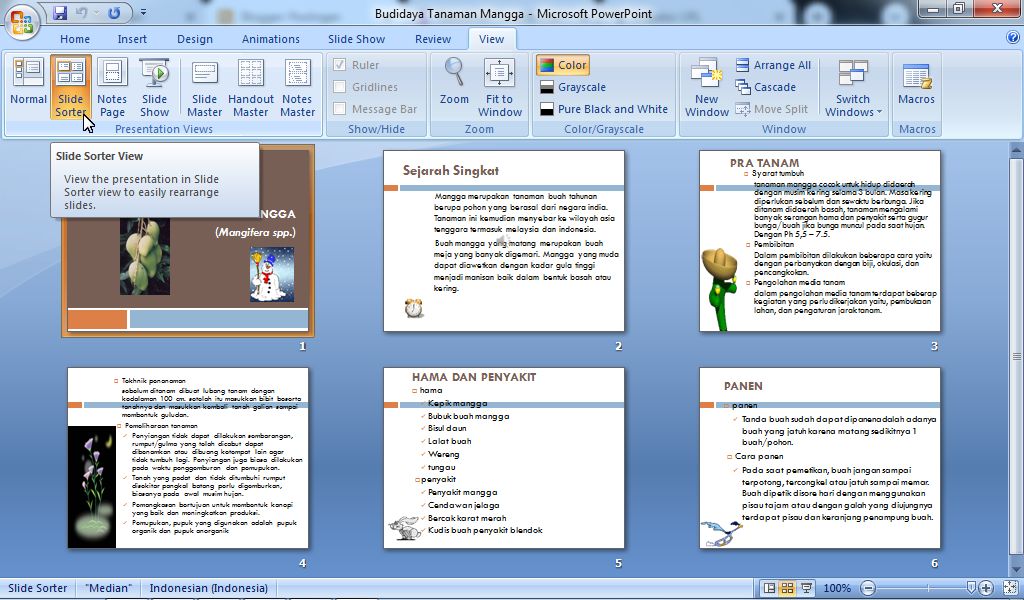
There are times when when we make presentation slides in Microsoft PowerPoint, we also take slides from other PPT files so that the slides in our PPT files get messy and we need to sort them back in the order we want. As for how to move the slides to the order we want, it's very easy. Before we change or adjust the position of the slides, you first need to change the Presentation Views from the "Normal" view to the "Slide Sorter" view so that the slide display can be clearer and makes it easier for us to change the slide order. More tutorials: How to Display Notes on PowerPoint How to Print Certain Slides in PowerPoint How to Show Thumbnails in PowerPoint How to Convert PowerPoint 2007 Slide to Picture Now, after that, friends, select a slide that you want to move its position by right-clicking on the desired slide with the mouse, then hold it down (don't release the click first) then slide it to the position or order you want, then release the clicks.  Do t...

How to Convert RAR to PDF

Image
Actually, I have made many posts regarding this topic or tutorial, but maybe the title is slightly different. Okay, get on with it, friends, as for how to change or rather remove a PDF file from a RAR file, the method is very easy. The first step, friends, must first install an application to read and open RAR files on all of your laptops, for example the WinRAR application which is widely used and is an application that must be present on every laptop or computer. More tutorials: How to Convert Word 2010 to PDF How to Convert a Word 2007 Document to PDF How to Turn Zip Into PDF How to Know PDF Paper Size Excel to PDF Converter in Excel 2007 Now after that, friends can right-click on the mouse RAR file which contains a PDF file. After that, friends select "Extract Here", and automatically the PDF file contained in the RAR file will appear in the same place or folder as the RAR file. If this method doesn't work, open the RAR file that contains the PDF file, then click the ...